Overview: Migrating Zerion to Codex With Zero Downtime
If you run a token tracker or wallet‑aware product on Zerion’s APIs today and want to move to Codex, you can migrate without downtime—but only if you treat it like a proper production cutover.
This tutorial gives you a step‑by‑step Zerion API migration guide to Codex’s trading‑grade on‑chain data layer. You’ll learn how to:
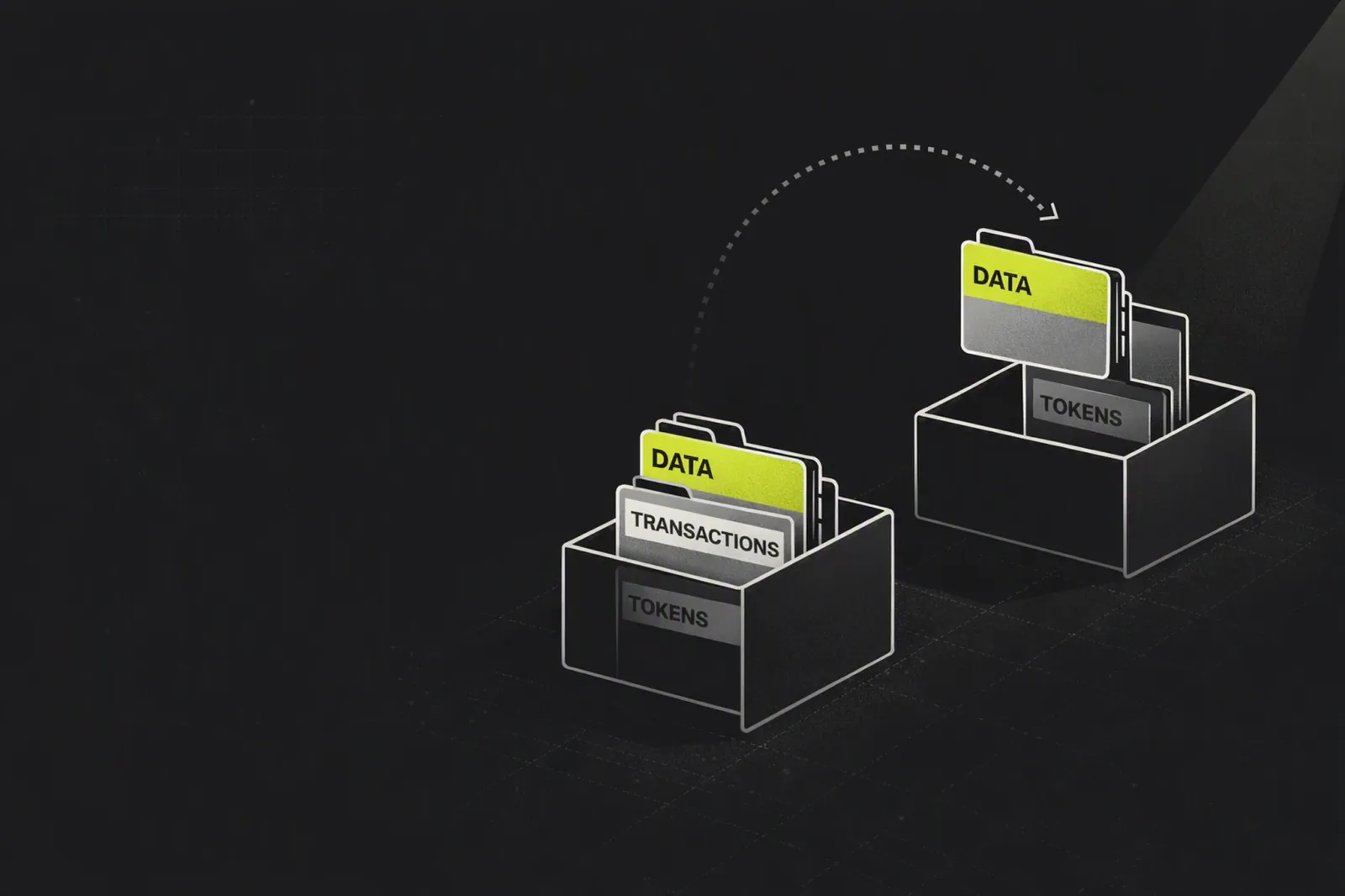
- Map Zerion portfolio and balance schemas to Codex
- Design a parallel‑run / expand → migrate → contract rollout
- Preserve wallet balances and portfolio views during the cutover
- Validate token balances after migration and keep a clean rollback path
It assumes you’ve already read the high‑level comparison in the pillar article “Codex vs Zerion: Token Tracker Data Layers for Wallet‑Aware Products” and now need a practical how‑to.
Prerequisites
Before starting the migration, make sure you have:
Existing Zerion integration
- Using
/wallets/{address}/portfolioand/wallets/{address}/chartor similar - Deployed in production for token trackers, portfolios, or wallet UIs
- Using
Codex account and API access
- Sign up at codex.io
- Get API keys and access to the GraphQL endpoint
- Review Codex docs, especially
balances,getTokenPrices,bars, subscriptions
Environment setup
- Ability to deploy code changes using blue/green or canary strategies
- Observability: logs + metrics (latency, error rates, response sizes)
Traffic plan
- Know peak RPS for your token tracker
- Align Codex plan/rate limits (e.g., Growth at ~300 RPS, Almost Free at ~5 RPS)
Step 1: Baseline Your Current Zerion Usage
First, you need a clear picture of what you’re using from Zerion. This is the baseline you’ll replicate (and improve) on Codex.
1.1 Inventory Your Endpoints
List all Zerion endpoints used by your token tracker:
GET /wallets/{address}/portfolio- Returns total value, 24h change, distribution by chain and type
GET /wallets/{address}/chart- Historical portfolio balance over time
- Any positions, NFTs, or transactions endpoints
For each endpoint, capture:
- Request shape (path, query params, auth)
- Response fields your UI or backend actually consumes
- Frequency (per‑wallet polling, batch jobs, cron tasks)
1.2 Document UI Dependencies
Zerion’s portfolio responses are dense and UI‑ready by design.
Document:
- Which fields drive your portfolio header (total value, change_1d)
- Which fields drive charts (timestamp/value pairs)
- Any chain breakdowns or position types shown in the UI
This baseline will become your migration acceptance criteria.
Step 2: Understand Codex’s Data Model
Codex is a GraphQL data layer, not a wallet‑centric REST API. You’ll replace Zerion’s aggregated endpoints with composable Codex queries.
2.1 Core Codex Objects for Token Trackers
For a token tracker migration, you’ll mainly use:
Balancetype (viagetBalancesor similar query)- Fields include
balance,shiftedBalance,uiBalance,balanceUsd,tokenPriceUsd - Token metadata:
name,symbol,decimals,isScam - Lifecycle info:
firstHeldTimestamp
- Fields include
Token pricing and charts
getTokenPrices(real‑time token prices, USD and native)bars/ OHLCV endpoints (candles, volume for charting)
Subscriptions
onBalanceUpdatedfor real‑time wallet balance updates via WebSockets
Codex is built for batching:
- Up to 25 tokens per
getTokenPricesrequest - Up to 200 results per
filterTokenspage - Up to 200 tokens per
balancesquery
Design your integration to batch where possible instead of looping per token.
2.2 Portfolio vs. Raw Balances
Key difference vs Zerion:
- Zerion’s
/portfoliogives total portfolio value + breakdown + change in one payload. - Codex focuses on raw but enriched balances and prices, letting you compute aggregates yourself.
Result: you’ll replicate Zerion‑style portfolio views as derived computations on top of Codex’s balances and prices.
Step 3: Map Zerion Schema to Codex Schema
This is the core of your schema mapping: convert Zerion’s wallet portfolio structure into a set of Codex queries and internal models.
3.1 Map Portfolio Header Fields
Typical Zerion portfolio header fields:
total.portfolio_valuechanges.absolute_1dchanges.percent_1d
Codex equivalents (computed in your backend):
Total portfolio value
- Query Codex balances for the wallet
- Sum
balanceUsdacross non‑scam tokens (token.isScam == false)
24h absolute and percent change
- Use Codex price history (
barsor price time‑series) per token - Reconstruct portfolio value at
t-24hvst-now - Compute:
changes.absolute_1d = total_now - total_24hchanges.percent_1d = (changes.absolute_1d / total_24h) * 100
- Use Codex price history (
3.2 Map Distribution by Chain and Asset Type
Zerion’s portfolio includes:
positions_distribution_by_chainpositions_distribution_by_type
Codex doesn’t pre‑aggregate this, but you can compute it using metadata:
By chain
- Use token/network metadata from balances (e.g.,
chainIdor network fields) - Group
balanceUsdby chain and compute percentages of total
- Use token/network metadata from balances (e.g.,
By type (token vs DeFi vs NFT)
- Use your own classification logic on top of Codex token metadata
- For DeFi positions, either:
- Model underlying LP/vault tokens through Codex token metadata
- Or maintain a mapping of protocol contracts to position types
3.3 Wallet Balance Chart Mapping
Zerion’s /wallets/{address}/chart returns historical portfolio value.
Codex FAQ states it does not store historical balances per wallet; there is no direct endpoint for past total USD portfolio value.
To preserve portfolio net‑worth history:
- Start snapshotting Codex balances in your own time‑series store.
- For example, every 5 minutes:
- Fetch wallet balances from Codex
- Compute total
balanceUsd - Store
(timestamp, total_value)in your database
Over time, this rebuilds your balance chart history on a provider‑independent basis.
Step 4: Design Your Dual‑Running Strategy (Parallel Change)
To achieve zero downtime API migration, follow Martin Fowler’s expand → migrate → contract pattern, combined with blue/green or canary rollout.
4.1 Expand: Support Both Zerion and Codex Internally
Introduce an internal abstraction layer:
Define a
PortfolioDataProviderinterface:- Methods:
getPortfolioSummary(address),getBalanceChart(address),getPositions(address)
- Methods:
Implement two providers:
ZerionPortfolioProvider(current implementation)CodexPortfolioProvider(Codex‑backed implementation)
Add a runtime config or feature flag:
provider=zerionorprovider=codexper environment or per wallet cohort
This expand step lets your app support both backends in parallel.
4.2 Blue/Green and Canary Rollout
For production migration:
- Deploy Codex‑backed provider to a green environment alongside existing blue.
- Use canary testing:
- Start by routing a small percentage (e.g., 1–5%) of wallets to Codex.
- Compare portfolio values and balances against Zerion for those wallets.
- Keep rollback simple:
- Switching feature flag back to Zerion returns you to the old behavior instantly.
4.3 Rate Limit and Capacity Planning
Before ramping traffic:
Estimate current RPS:
- Wallet portfolio views per minute
- Background jobs querying balances/prices
Align with Codex rate limits:
- Growth plan supports ~300 requests/second.
- Each GraphQL query and each subscription message counts as a request.
Use Codex’s batching capabilities to reduce per‑wallet requests.
Step 5: Implement Codex Queries and Subscriptions
With the parallel‑change scaffold in place, build the actual Codex integration.
5.1 Replace Zerion Portfolio Fetches With Codex Balances
For each wallet:
- Call Codex balances query (GraphQL):
query WalletBalances($address: String!, $cursor: String) {
  balances(walletAddress: $address, after: $cursor, first: 200) {
    edges {
      node {
        balance
        uiBalance
        balanceUsd
        tokenPriceUsd
        firstHeldTimestamp
        token {
          id
          name
          symbol
          decimals
          isScam
        }
      }
    }
    pageInfo {
      hasNextPage
      endCursor
    }
  }
}
- Compute portfolio aggregates:
- Filter out balances where
token.isScam == true. - Sum
balanceUsdfor total value. - Group by chain, type, or any dimensions you need.
5.2 Add Price and Chart Data
For token‑level charts:
- Use Codex
barsor OHLC endpoints:- Fetch OHLCV data per token and timeframe.
- Feed directly into trading‑style charts.
For wallet‑level portfolio charts:
- Use your snapshot store (from Step 3.3).
- Optionally enrich with Codex token price history to reconstruct retroactively.
5.3 Enable Real‑Time Updates With onBalanceUpdated
Instead of polling Zerion, move to real‑time wallet updates:
- Subscribe to
onBalanceUpdatedfor each active wallet session. - On message:
- Update the internal balance set for that wallet.
- Recompute portfolio total and update the UI immediately.
This matches the industry trend where wallets and trackers are trading‑grade data products, not static balance viewers.
Step 6: Run Parallel Validation and Reconciliation
During dual‑running, you must verify that Codex outputs match—or intentionally differ from—Zerion’s results.
6.1 Build a Reconciliation Job
Create a scheduled job that:
- Picks a sample of wallets (e.g., 1,000–10,000, depending on scale).
- Fetches portfolio data from both providers:
- Zerion portfolio endpoint
- Codex balances + derived aggregates
- Compares:
- Total portfolio USD value
- Number of positions/tokens
- Presence of long‑tail tokens and new launchpad assets
Flag differences above a threshold (e.g., 0.5–1% of portfolio value) for review.
6.2 Expect and Classify Differences
Not all discrepancies are bad. Some are data quality improvements.
Common patterns:
- Scam filtering: Codex may drop scammy tokens due to
isScam, lowering total value. - Long‑tail coverage: Codex indexes 70M+ tokens across 80+ networks; you may see more tokens than Zerion, especially launchpad assets.
- DeFi position modeling: Zerion’s flexible chart endpoint can include complex positions; Codex may represent them as underlying tokens. Decide how you want to treat them.
Classify differences into:
- Acceptable improvements (documented and communicated to users if visible)
- Bugs or mapping errors to fix in your Codex integration
6.3 Test Prediction Market and Advanced Surfaces (If Applicable)
If your token tracker includes:
- Prediction market data (Polymarket, Kalshi)
- Launchpad lifecycle views
Use Codex’s dedicated endpoints:
filterPredictionEvents,filterPredictionMarkets, trader statslaunchpadlifecycle recipes
Validate latency and correctness for these advanced surfaces as part of your parallel run.
Step 7: Migrate Traffic Gradually and Monitor
Once Codex outputs are validated, start moving real users.
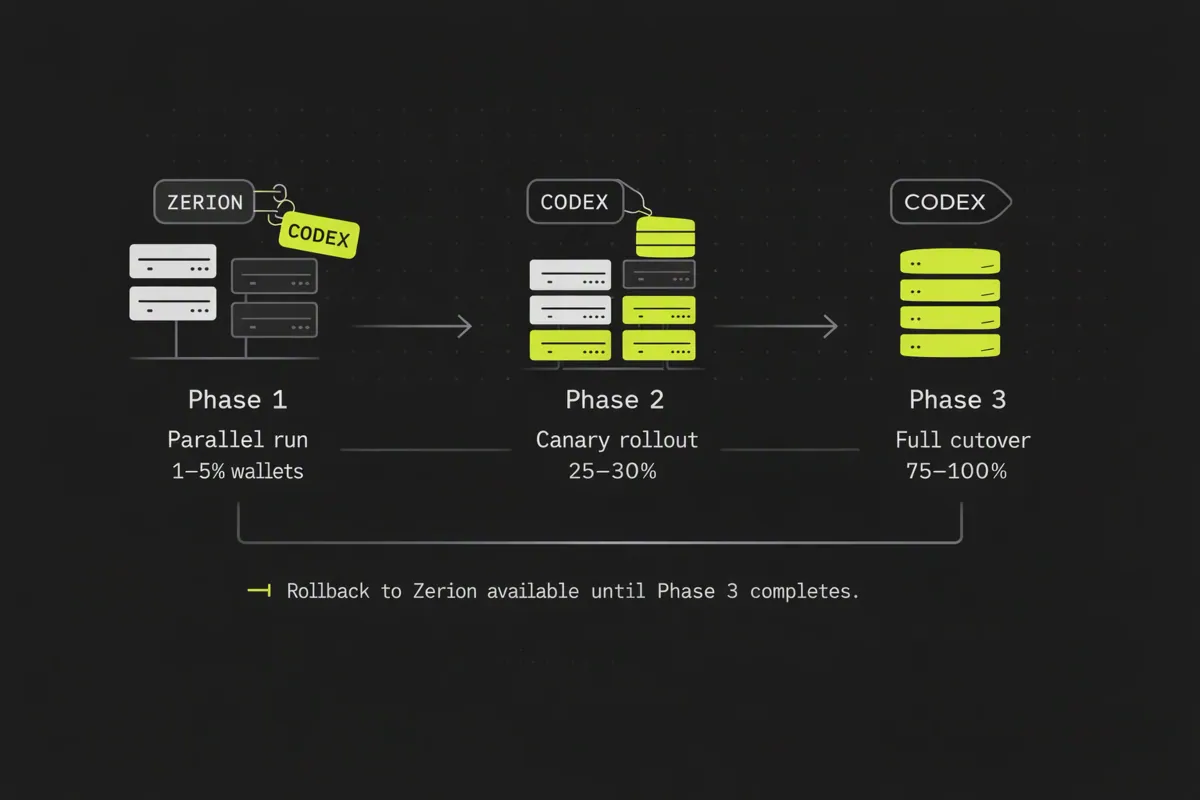
7.1 Traffic Migration Plan
Use a staged canary rollout:
- Phase 1: 1–5% of wallets served by Codex provider.
- Phase 2: 25–30% of wallets.
- Phase 3: 75–100% of wallets.
At each phase, monitor:
- Latency: Codex is optimized for sub‑second responses and high RPS; confirm it meets your SLA.
- Error rate: GraphQL errors, rate limit hits, subscription disconnects.
- Portfolio accuracy: Compare sample wallets against Zerion for sanity.
7.2 Maintain Rollback Capability
Throughout migration:
- Keep Zerion integration live and healthy.
- Preserve the
providerfeature flag as a runtime switch. - Define a clear runbook:
- Under what metrics or error thresholds you revert to Zerion.
Only after Codex has run cleanly at 100% traffic for a defined period (e.g., 1–2 weeks), consider decommissioning Zerion.
Step 8: Contract: Remove Zerion and Harden Codex Integration
After successful full rollout and a stable period, complete the migration.
8.1 Decommission Zerion Calls
- Remove
ZerionPortfolioProviderimplementation. - Delete any Zerion‑specific schema mapping code.
- Sanitize configurations and secrets: revoke Zerion API keys if appropriate.
This is the contract phase in parallel change: removing the old path once all consumers are fully migrated.
8.2 Optimize Codex Usage
Now that Codex is your primary trading‑grade data layer, optimize:
Batching strategies:
- Use
getBalancesandgetTokenPricesto reduce calls. - Avoid per‑token loops in favor of multi‑token queries.
- Use
Subscriptions vs queries:
- Use queries for one‑time fetches.
- Use
onBalanceUpdatedand other WebSockets for live surfaces.
Cost and performance:
- Monitor request volumes vs plan limits.
- Use caching where appropriate for commonly requested wallets or tokens.
8.3 Extend Beyond 1:1 Replacement
Finally, treat this migration as an upgrade, not just a swap:
- Add richer charts (OHLCV, depth, volume) for trading users.
- Surface wallet analytics powered by Codex’s holder and liquidity data.
- Integrate prediction markets or launchpad views for new product surfaces.
Codex’s depth and breadth (700M+ wallets, 70M+ tokens, 80+ networks) give you more room to ship features quickly without building your own indexers and ETL.