High‑Throughput Crypto APIs for TradingView and Exchanges: Architecture Guide
This pillar guide explains how to design high‑throughput crypto APIs for TradingView, exchange frontends, and multi‑venue data.
It compares approaches to the best real‑time crypto data API trading 2024 setups, covering:
- TradingView integration patterns (Datafeed API, UDF adapter)
- WebSocket vs REST for real‑time crypto charts
- Serving 100 top cryptocurrency feeds to 100k+ concurrent clients
- Managing TradingView API key distribution at scale
- Multi‑venue aggregation and snapshot+delta handling
- Where specialized providers like Codex fit as data infrastructure examples
Throughout, vendor‑specific behavior is backed by docs from TradingView, Binance, Coinbase, Kraken, and Codex.
1. Core Requirements for High‑Throughput Crypto Data APIs
For high‑traffic trading apps, your crypto data API must satisfy a few non‑negotiables:
Low latency
- p95 under 300–500 ms for REST queries.
- Sub‑second end‑to‑end for WebSocket chart updates.
High throughput
- Tens of thousands of messages per second.
- 100+ live feeds (e.g., 100 top cryptocurrency pairs) per region.
Correctness and sequencing
- Snapshots aligned with deltas using sequence numbers.
- Clear recovery strategy on reconnect.
Operational resilience
- Multiple WebSocket connections per client type.
- Rate limiting, backpressure, and failover.
Secure, scalable key management
- Short‑lived tokens for untrusted frontends.
- Rotation and monitoring for backend keys.
Codex is one example of a data layer that focuses specifically on trading‑grade token and prediction market data across 70M+ tokens and 80+ networks, exposing normalized data via a high‑performance API.1 While this guide is vendor‑neutral in its architecture advice, Codex is used as a reference implementation where concrete behavior matters.2
2. TradingView Integration Fundamentals
TradingView’s charting stack does not provide market data by itself.
You are responsible for feeding prices, bars, and metadata from your backend.
2.1 TradingView Datafeed vs UDF
TradingView documents two main integration paths:3
Datafeed API (recommended)
- Implemented as a JavaScript object exposed to the Charting Library.
- Calls back into your backend via WebSockets, HTTP, or any protocol you choose.
- Best for high‑throughput, low‑latency, custom logic.
UDF (Unified Data Feed) adapter
- HTTP‑based reference implementation.
- Fastest way to get started, but does not stream realtime data out of the box.
- Better suited to dashboards or lower‑frequency charts.
TradingView explicitly recommends using the Datafeed API for maximum flexibility and WebSocket‑based realtime data.4
2.2 Key TradingView Concepts
TradingView treats each chart as a unique dataset defined by:5
symbolresolution(e.g., 1s, 1m, 5m, 1h, 1d)currencychart type
This has architectural implications:
- Each subscription is effectively a separate stream.
- TradingView will keep multiple subscriptions alive and delays unsubscribe by ~5 seconds so users can switch back quickly.
- For large symbol universes, TradingView recommends using
searchSymbolsPaginatedand tuningsymbol_search_request_delay.5
2.3 Minimal Datafeed API Example
Below is a simplified schematic of a TradingView Datafeed implementation that uses your backend’s WebSocket for bars.
const datafeed = {
  onReady: (cb) => {
    cb({
      supports_search: true,
      supports_group_request: false,
      supported_resolutions: ["1", "5", "15", "60", "240", "D"],
    });
  },

  searchSymbols: (userInput, exchange, symbolType, onResultReady) => {
    fetch(`/api/symbols?query=${encodeURIComponent(userInput)}`)
      .then(res => res.json())
      .then(data => onResultReady(data));
  },

  resolveSymbol: (symbolName, onSymbolResolved, onResolveError) => {
    fetch(`/api/symbol/${encodeURIComponent(symbolName)}`)
      .then(res => res.json())
      .then(onSymbolResolved)
      .catch(() => onResolveError("Symbol not found"));
  },

  getBars: (symbolInfo, resolution, periodParams, onHistory, onError) => {
    const { from, to } = periodParams;
    fetch(`/api/bars?symbol=${symbolInfo.ticker}&res=${resolution}&from=${from}&to=${to}`)
      .then(res => res.json())
      .then(bars => onHistory(bars, { noData: bars.length === 0 }))
      .catch(() => onError("Bars error"));
  },

  subscribeBars: (symbolInfo, resolution, onRealtimeCallback, subscriberUID, onResetCache) => {
    const ws = connectRealtime(symbolInfo.ticker, resolution);

    ws.onmessage = (event) => {
      const bar = JSON.parse(event.data);
      onRealtimeCallback(bar);
    };

    subscriptions[subscriberUID] = ws;
  },

  unsubscribeBars: (subscriberUID) => {
    const ws = subscriptions[subscriberUID];
    if (ws) ws.close();
    delete subscriptions[subscriberUID];
  },
};
The backend /api/bars and WebSocket endpoints are where your crypto data API architecture becomes critical.
3. WebSocket vs REST for Real‑Time Crypto Charts
3.1 WebSocket vs REST for Real‑Time Crypto Charts
Vendor docs consistently recommend WebSockets for volatile, realtime use cases:
Binance
Coinbase Advanced Trade
Kraken
- WebSocket v2 is recommended for new integrations, while Unified FIX is reserved for lowest‑latency institutional/HFT use where deterministic sequencing is mandatory.10
Taken together, a clear pattern emerges:
WebSocket
- Primary for realtime charts, order books, positions.
- Requires careful handling of sequence numbers, heartbeats, and reconnects.
REST/HTTP
- Best for snapshots, historical data, and ad‑hoc analytics.
- Useful as backup/failover when WebSockets drop.
In practice, a high‑throughput crypto charting stack should:
- Use WebSockets to stream tick/bar updates into TradingView.
- Use REST for initial snapshots (
getBars, symbol lists, metadata). - Implement explicit replay windows for gaps.
4. Multi‑Venue Data: Aggregate Order Book Across Exchanges
High‑traffic exchanges and dashboards often need multi‑venue data aggregation:
- Combine prices and liquidity from Binance, Coinbase, Kraken, and on‑chain DEXs.
- Compute synthesized reference prices or aggregated depth.
- Present unified charts and order books.
4.1 Common Multi‑Venue Patterns
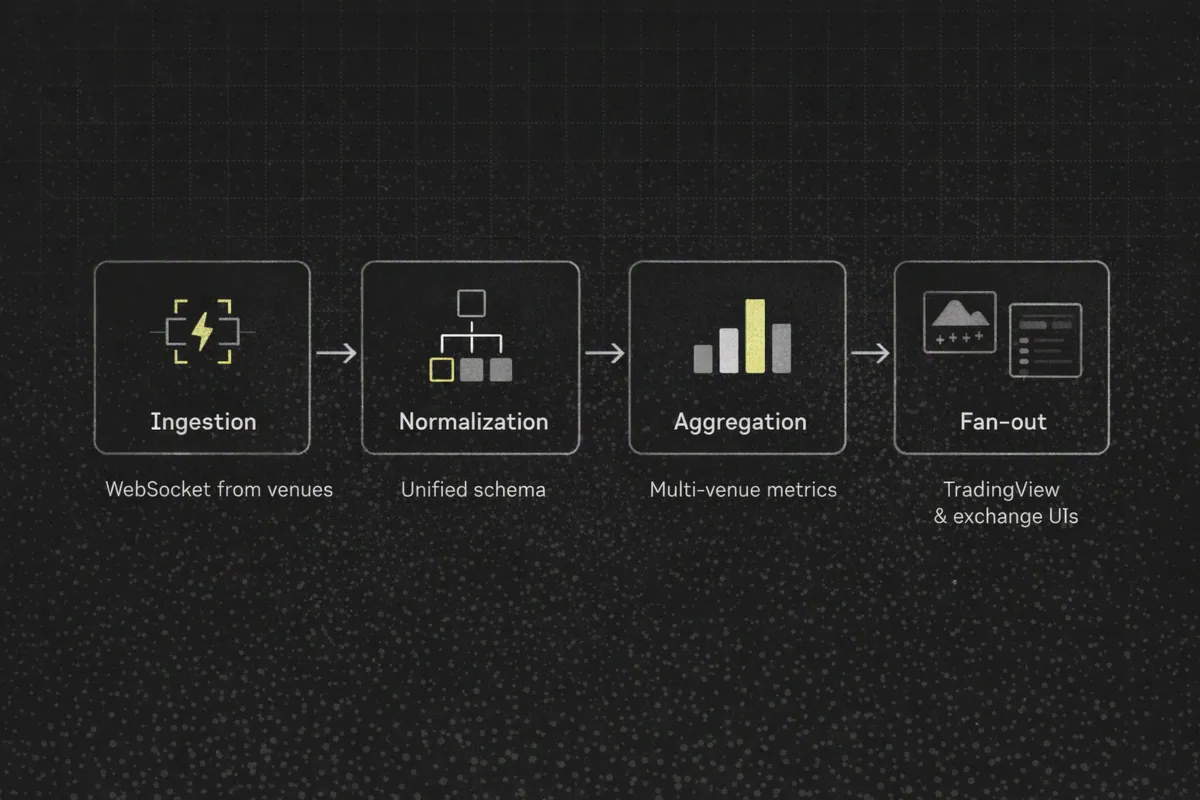
A typical architecture to aggregate order book across exchanges looks like:
Ingestion layer
- Dedicated WebSocket clients per venue.
- Separate connections for
/public,/market,/privatewhere available (e.g., Binance futures).7
Normalization layer
- Convert each venue’s format into a unified schema:
exchange_idsymbol(normalized across venues)seq(local sequence or monotonic internal counter)bids[]/asks[]withprice,size.
- Convert each venue’s format into a unified schema:
Aggregation layer
- Merge books:
- Per‑venue book stored separately.
- Aggregated book computed on demand (e.g., best bid/ask, VWAP).
- Merge books:
Serving layer
- WebSocket feeds for live aggregated books.
- REST endpoints for snapshots and historical depth.
Codex is one example of a provider that abstracts much of this for on‑chain tokens: it indexes thousands of transactions per second across 80+ networks, normalizes trades, prices, holders, and aggregates, and provides real‑time and historical token prices with trading‑ready chart data.12
5. Snapshot + Delta + Sequencing: Precise Algorithms
Every major venue recommends a snapshot + realtime delta + sequencing model:
Binance
How to manage a local order book correctlydescribes fetching an HTTP snapshot, then streaming WebSocket updates withu/Usequence numbers and discarding out‑of‑range deltas.11
Coinbase
- Warns that WebSocket feeds can drop or reorder messages; recommends tracking
sequenceand reconnecting on gaps.9
- Warns that WebSocket feeds can drop or reorder messages; recommends tracking
5.1 Alignment Algorithm (Order Book Example)
Basic algorithm to align snapshot and deltas:
Fetch snapshot via REST
- Suppose snapshot has
last_seq = S.
- Suppose snapshot has
Connect WebSocket and start receiving deltas
- Each delta has
seqoru(update sequence).
- Each delta has
Drop pre‑snapshot deltas
- Ignore any delta where
seq <= S.
- Ignore any delta where
Apply in order
- For each delta with
seq == S + 1, apply it to local book. - Increment
S.
- For each delta with
Handle gaps
- If you see
seq > S + 1, you have missed updates. - Trigger resync: fetch new snapshot, reset
S, and continue.
- If you see
5.2 Pseudocode for Gap Detection and Replay
S = load_snapshot()  # returns last_seq from REST snapshot

for delta in websocket_stream():
    seq = delta.seq

    if seq <= S:
        # already applied or pre-snapshot; skip
        continue

    if seq == S + 1:
        apply_delta(order_book, delta)
        S = seq
        continue

    # Gap detected
    logger.warn(f"Sequence gap: have {S}, got {seq}. Resyncing…")
    order_book = load_snapshot()
    S = order_book.last_seq
In more advanced setups:
- Maintain a bounded replay buffer of recent deltas by sequence.
- On reconnect, use snapshot
S_snapshotand replay buffered deltas withseq > S_snapshotto catch up.
6. Reconnection and Resubscribe Logic
Coinbase emphasizes that even WebSocket connections can drop or reorder data.9
Your frontend subscription logic should:
Detect disconnects
- WebSocket
onclose/onerrorevents. - Heartbeat timeouts (e.g., no heartbeat for N seconds).
- WebSocket
Reconnect with jitter
- Backoff strategy (e.g., 1s, 2s, 5s, 10s).
- Random jitter to avoid thundering herd.
Resubscribe all feeds
- Track active subscriptions per connection.
- Re‑issue
subscribemessages after reconnect.
Resync state
- Fetch a fresh snapshot.
- Resume applying deltas with sequence checks.
6.1 Pseudocode for Reconnect & Resubscribe
function connect() {
  const ws = new WebSocket(MARKET_DATA_URL);

  ws.onopen = () => {
    // Resubscribe all known feeds
    activeSubscriptions.forEach(sub => {
      ws.send(JSON.stringify({
        type: "subscribe",
        symbol: sub.symbol,
        channels: sub.channels,
      }));
    });
  };

  ws.onmessage = (event) => handleMessage(JSON.parse(event.data));

  ws.onclose = () => scheduleReconnect();
  ws.onerror = () => scheduleReconnect();

  currentSocket = ws;
}

function scheduleReconnect() {
  const delay = computeBackoff(); // e.g., exponential with jitter
  setTimeout(connect, delay);
}
Combined with the snapshot+delta algorithm, this preserves chart stability even under network instability.
7. Serving 100 Top Cryptocurrency Feeds at Scale
Designing for 100 top cryptocurrency feeds and 100k+ concurrent clients requires capacity planning.
7.1 Capacity Model (Rule‑of‑Thumb)
Assume:
- 100 symbols.
- Each symbol emits an average of 5 bar updates per minute (tick‑compressed).
- 100k concurrent clients.
If you use server‑side fan‑out (one stream per symbol, broadcast to subscribed clients):
Upstream ingestion
- 100 * 5 = 500 updates/min (about 8–9 updates/sec).
Downstream delivery
- Worst case: every client subscribed to all symbols.
- 100k clients * 8 updates/sec ≈ 800k messages/sec.
To manage this:
- Use topic‑based broadcasting (symbol‑level channels) instead of per‑client queries.
- Compress payloads (binary/WebSocket, gzip at edge where appropriate).
- Consider edge fan‑out via CDNs or region‑local multiplexers.
Codex’s Growth plan rate limits (e.g., 300 requests/sec)12 illustrate one approach: batch data for multiple tokens per request or subscription (Codex subscribers can batch up to 25 tokens in onPricesUpdated).2
7.2 Example WebSocket Message for Bar Updates
Canonical bar payload for TradingView‑compatible feeds:
{
  "symbol": "BTCUSD",
  "resolution": "1",
  "time": 1724937600,
  "open": 27000.0,
  "high": 27150.5,
  "low": 26980.0,
  "close": 27110.2,
  "volume": 12.345,
  "seq": 123456789
}
TradingView’s subscribeBars expects simple OHLCV bars; including seq allows your client to detect gaps and resync.
7.3 Example Symbol Metadata Payload
resolveSymbol typically returns metadata like:
{
  "name": "BTCUSD",
  "ticker": "BTCUSD",
  "description": "Bitcoin / US Dollar",
  "type": "crypto",
  "exchange": "MultiVenue",
  "session": "24x7",
  "timezone": "Etc/UTC",
  "minmov": 1,
  "pricescale": 100,
  "has_intraday": true,
  "supported_resolutions": ["1", "5", "15", "60", "240", "D"],
  "data_status": "streaming"
}
This schema matches TradingView’s symbol metadata expectations while leaving room for your own fields.4
8. TradingView API Key Management at Scale
8.1 Principles for TradingView API Key Management at Scale
While TradingView’s Charting Library itself does not require an API key, your crypto data API that powers it will.
Key management is now a scaling concern, not a footnote:
Codex distinguishes between:
- Long‑lived secret keys for trusted servers.
- Short‑lived keys with expiration and request limits for untrusted frontends.13
The Graph Market warns not to expose JWT tokens in client‑side code and centralizes key creation/rotation/usage monitoring.14
Best practices:
- Never expose root secrets to browsers or mobile clients.
- Use short‑lived signed tokens (JWT or HMAC) per session with:
- Allowed scopes (e.g.,
read:prices,read:charts). - Rate limits and expiration embedded.
- Allowed scopes (e.g.,
- Implement key rotation at the gateway:
- Maintain key IDs (kid) with active/inactive states.
- Support dual‑key periods to avoid downtime.
- Monitor usage per key:
- Detect anomalous spikes or abuse.
- Tie usage back to tenant/account.
For TradingView frontends, a common pattern is:
- Backend holds long‑lived secret for Codex/venues.
- Frontend receives short‑lived access token minted by backend.
- TradingView Datafeed runs in frontend, calls backend with that token; backend fans out to external providers using its secret.
9. Benchmarking Plan: How to Validate Your Architecture
To claim you have one of the best crypto data APIs for high traffic trading apps, you need reproducible benchmarks.
9.1 Tools
Common load‑testing tools:
- k6 — scriptable HTTP/WebSocket load testing, good for CI pipelines.
- Artillery — scenario‑based testing for WebSockets and HTTP.
- Locust — Python‑based user behavior simulation.
9.2 Scenarios to Test
REST snapshot throughput
- Endpoint:
/api/bars?snapshot. - Target: 1k–5k requests/sec.
- Metrics: p95/p99 latency, error rate, CPU, memory.
- Endpoint:
WebSocket burst traffic
- 100 symbols, 10 updates/sec each (1k messages/sec upstream).
- 10k, then 100k subscribed clients (simulated connections).
- Metrics: message delivery latency, dropped connections, backpressure behavior.
Reconnect storm
- Simulate network partition causing 10k clients to reconnect within 30 seconds.
- Validate backoff/jitter and gateway stability.
9.3 Target Metrics (Example SLOs)
Reasonable SLOs for high‑traffic trading apps:
REST
- p95 latency < 250 ms.
- p99 latency < 500 ms.
WebSocket
- End‑to‑end update latency < 250 ms under normal load.
- < 500 ms during peak bursts.
Availability
- 99.9%+ uptime for retail applications.
- 99.99%+ for institutional/HFT when supported by lower‑level protocols (e.g., FIX at Kraken).10
9.4 Example Capacity Calculation: 100 Feeds, 100k Clients
Assume:
- Average bar payload: 200 bytes.
- 100 symbols, 5 updates/min each (≈8.3/sec).
- 100k clients subscribed to 10 symbols on average.
Calculations:
- Updates/sec per symbol: 8.3.
- Updates/sec total (ingestion): 830.
- Client subscriptions: 100k * 10 = 1M symbol subscriptions.
- Messages/sec downstream (fan‑out): 830 updates/sec * 10 average subscribers per update ≈ 8,300 msgs/sec (with topic‑level fan‑out).
Bandwidth:
- 8,300 msgs/sec * 200 bytes ≈ 1.66 MB/sec ≈ 13.3 Mbps.
This is comfortably manageable on a modest cluster when using efficient fan‑out and compression. The challenge is CPU and correctness, not just network.
10. Where Specialized Data Layers Fit (Vendor Examples)
Managing:
- Dozens of venues.
- 80+ chains.
- 70M+ tokens.
…is a massive engineering burden.
Infrastructure‑grade data layers such as Codex exist to offload this.
10.1 Example: Codex as Trading‑Grade On‑Chain Data Layer
According to Codex’s public materials:12
Coverage
- 70M+ tokens.
- 80+ networks.
- 700M+ wallets.
Capabilities
- Real‑time and historical token prices in USD and native currency.
- Trading‑ready chart data (OHLC, candles, volume).
- Aggregated metrics: liquidity, volume, unique wallets, TVL‑like stats.
- Holders and balances across chains.
- Scam filtering and token metadata.
- Prediction market data (events, markets, trades, trader analytics) for platforms like Polymarket and Kalshi (beta).15
Performance
- Indexes thousands of transactions per second.
- Growth plan rate limit of 300 requests/sec per key.12
Architecture‑wise, Codex demonstrates how a unified read layer can:
- Remove the need for custom indexers, RPC management, and ETL pipelines.
- Provide normalized data objects (tokens, trades, charts, holders) instead of raw logs.
- Be consumed directly by TradingView Datafeed implementations and exchange UIs.
Other vendors like The Graph and Dune focus on similar concepts around read‑layer infrastructure and streaming products, but with different specialization (subgraphs, analytics).16
12. Next Steps
To build ultra‑fast crypto APIs for TradingView and exchange frontends:
- Architect around WebSockets + REST snapshots.
- Implement strict sequencing and reconnection logic.
- Plan capacity for 100+ feeds and 100k+ concurrent clients using fan‑out and batching.
- Use infrastructure‑grade providers (e.g., Codex for on‑chain data) where it saves engineering time and complexity.
- Benchmark regularly with k6/Artillery/Locust and tune until your metrics meet trading‑grade SLOs.
When you get these fundamentals right, adding new venues, networks, and features becomes a matter of configuration rather than re‑architecture.
Sources
- Codex homepage — scale and coverage, https://www.codex.io/
- Codex docs — token and chart data, https://docs.codex.io
- TradingView Charting Library — Connecting data, https://www.tradingview.com/charting-library-docs/latest/connecting_data/
- TradingView Datafeed API docs, https://tradingview.com/charting-library-docs/latest/connecting_data/datafeed-api/
- TradingView Datafeed subscriptions and symbol search guidance, https://it.tradingview.com/charting-library-docs/latest/connecting_data/datafeed-api/datafeed-subscriptions/
- Binance Spot WebSocket Streams, https://developers.binance.com/en/docs/products/spot/web-socket-streams
- Binance USDS Futures WebSocket Market Streams and routing, https://developers.binance.com/en/docs/products/derivatives-trading-usds-futures/websocket-market-streams/Important-WebSocket-Change-Notice
- Coinbase Advanced Trade WebSockets overview, https://docs.cdp.coinbase.com/coinbase-business/advanced-trade-apis/websocket/websocket-overview
- Coinbase Exchange WebSocket feed best practices, https://docs.cdp.coinbase.com/exchange/websocket-feed/best-practices
- Kraken API comparison and protocol guidance, https://docs.kraken.com/exchange/guides/general/api-comparison
- Binance order book alignment guide, https://developers.binance.com/en/docs/products/derivatives-trading-usds-futures/websocket-market-streams/How-to-manage-a-local-order-book-correctly
- Codex rate limits, https://docs.codex.io/concepts/rate-limits
- Codex authentication and key concepts, https://docs.codex.io/concepts/authentication
- The Graph Market key security guidance, https://thegraph.com/docs/en/substreams/providers/the-graph-market/
- Codex prediction markets docs, https://docs.codex.io/prediction-markets
- The Graph network stats and API capabilities, https://thegraph.com/