What is the best Base explorer?
A Base explorer is a website that lets you look up any transaction, wallet, token, contract or block on Base, Coinbase's Ethereum layer 2. Basescan and Blockscout are the best-known options. Codex Scan's Base explorer is a free alternative that adds live prices, DEX trades, holders and wallet PnL from Codex to every page, and searches 57 networks (as of October 2026) at once when an address lives on more than one chain.
Use it to:
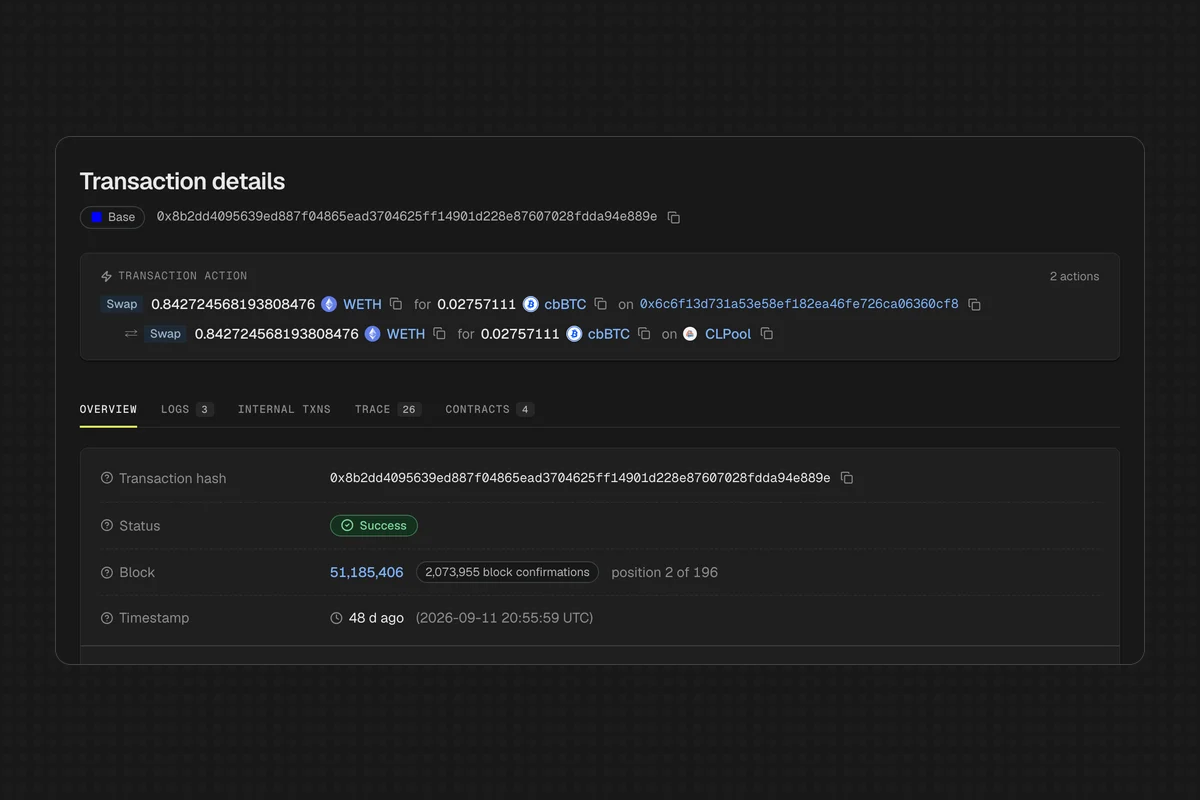
- Check a transaction: paste a hash and read a plain-language summary like "Swap 0.84 WETH for 0.0276 cbBTC on CLPool", plus decoded logs, internal transactions and the full call trace.
- Vet a token: see price, market cap, liquidity, holder count, top 10 holder share, creator and verified source code on one page.
- Look up a wallet: see its ETH balance, token holdings, DEX trades and 30-day realized PnL.
- Browse the network: top, trending and new Base tokens, the busiest DEXes and launchpads like Zora and Clanker.
Every page is built on the same onchain data you get from the Codex API, so anything you can see in Scan you can also pull into your own app.
How do I look up a Base transaction?
Paste the transaction hash into the search box at scan.codex.io. Scan recognizes Base hashes and goes straight to the transaction page at scan.codex.io/base/tx/<hash>. You don't need to pick the network first.
A Base transaction page shows:
- Transaction action: a one-line summary of what happened, for example a swap with the tokens, amounts and pool.
- Status and timing: block, confirmations, position in block and timestamp.
- Who and what: the sender, the contract it called and the decoded function name.
- Fees: the full fee, including the L1 data fee Base pays to post to Ethereum, plus gas price, gas used and base and priority fees.
- Tokens transferred and the raw input data.
The tabs go deeper. Logs decodes each event with the contract name. Internal lists ETH moved by contract calls. Trace shows the call tree, every CALL and STATICCALL with contract and function names and gas. Contracts lists every contract the transaction touched and whether its source is verified. Here's a real Base swap to see the layout.
If you need call trees in your own product, our guide to tracing transactions with an API covers how they work.
How do I check a token on Base before buying it?
Search the token name, symbol or contract address. A Base token page, like USDC on Base, puts the checks most people run in one place:
- Market data: price and 24h change, market cap, liquidity (and liquidity as a share of market cap), 24h volume and trades, and which exchanges it trades on.
- Holders: total holder count, the share held by the top 10 wallets, and a ranked holder list with balances and USD value.
- Contract: creator address, creation transaction and age, proxy status and implementation address, and verified source code (for example, matched through Sourcify).
- Trading activity: buys, sells, buyers, sellers and volume over 5m, 1h, 4h, 12h and 24h windows, plus a live DEX trade feed.
- Read and Write: call the contract's read functions, or simulate a write without connecting a wallet.
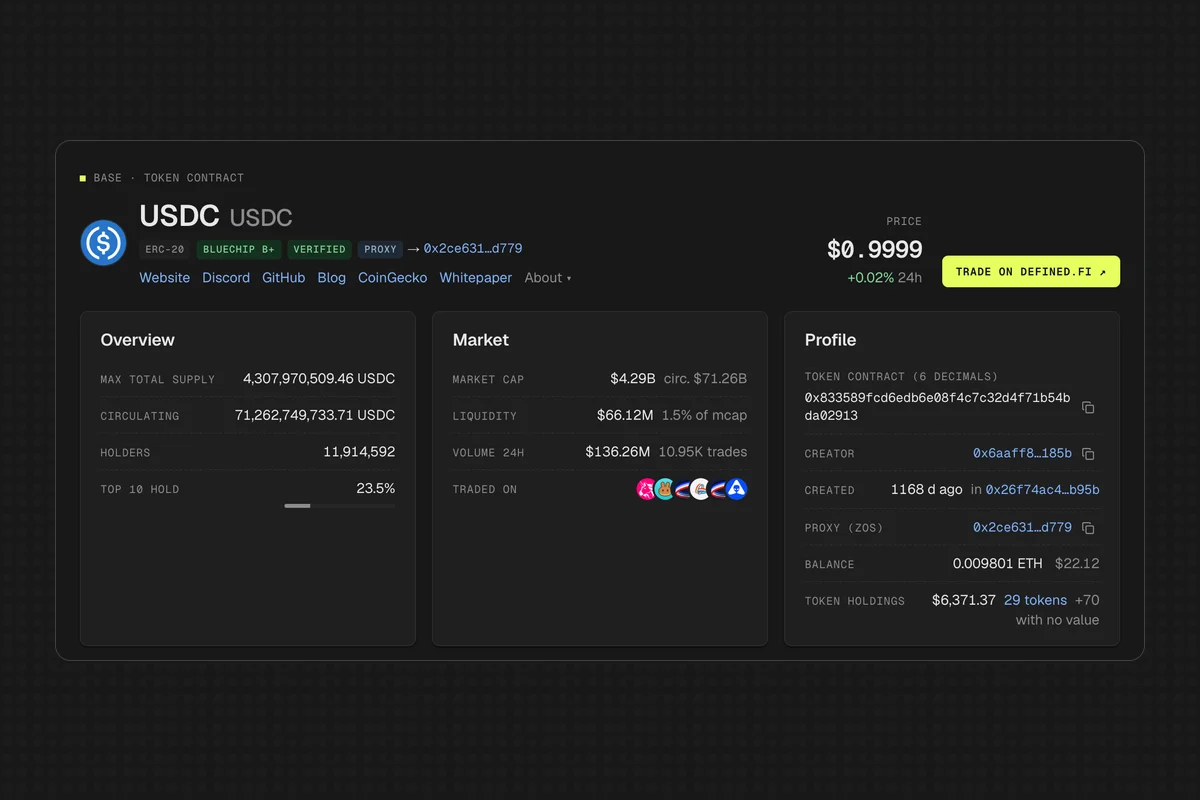
The token lists at scan.codex.io/base/tokens hide potential scams and low-liquidity tokens by default. That's a helpful filter, but not a guarantee, so still check holders and liquidity yourself. For how Codex flags risky tokens, see scam detection.
How do I look up a wallet on Base?
Paste the address into search. If the address only exists on Base, Scan opens its scan.codex.io/base/address/<address> page directly. If it exists on several networks, you get a list of every network it appears on, each with its native balance, and you pick Base.
A Base wallet page shows the ETH balance and USD value, token holdings, total value, how many transactions it has sent, when it was first and last seen, and a 30-day DEX trading summary with realized PnL, volume, trades and win rate. Three tabs go further:
- DEX activity: every swap with what was sent and received, the USD value and the pool.
- Analytics: realized PnL and volume per day, plus win rate, average trade and tokens traded across 24h, 7d, 30d and 1y.
- Assets: what the wallet holds.
The wallet view focuses on trading. If you need full transfer history for an app, read how to design a wallet transaction history API.
How is Codex Scan different from Basescan and Blockscout?
All three cover the basics well: decoded transactions, traces, verified contracts, holders and name resolution. The difference is market data. Scan adds liquidity, DEX trades and wallet PnL from Codex, and searches every network from the same box. Basescan (from the Etherscan team) and Blockscout offer watchlists with email alerts, which Scan doesn't.
| Feature | Codex Scan | Basescan | Blockscout |
|---|---|---|---|
| Plain-language transaction summary | Yes | Yes ("Transaction Action") | Yes |
| Internal transactions and call trace | Yes | Yes | Yes |
| Token price, market cap and holders | Yes | Yes | Yes |
| Token liquidity and DEX trade feed | Yes | No | No |
| Wallet PnL and win rate | Yes | No | No |
| Verified source and Read/Write | Yes | Yes | Yes |
| Address labels | Yes | Yes | Yes |
| Basenames and ENS in search | Yes | Yes | Yes |
| Search every chain from the same box | Yes, 57 networks | Separate site (Blockscan) | Separate site (blockscout.com) |
| Address watchlist with email alerts | No | Yes, with an account | Yes, with an account |
| API for Base data | Codex API (GraphQL) | Paid plan for Base | Free, no key |
Checked October 29, 2026. Etherscan's API V2 lists Base as paid tier only, except source code and ABI endpoints. Blockscout's API allows 300 requests per minute per IP without a key. Explorer features change often, so confirm on each site before you rely on one.
Pick by job. For token research and following traders, Scan's market data saves a trip to a separate charting site. To get emailed when an address moves, use Basescan or Blockscout. To run your own explorer, Blockscout is self-hostable, though since v11 (April 2026) it ships under a source-available license rather than GPL. You can also use Scan without an account.
Here's where each job lives in Scan:
- Transactions:
/base/tx/<hash> - Tokens, wallets and contracts:
/base/address/<address> - Blocks:
/base/block/<number> - Top, trending and new tokens: /base/tokens
- DEXes by volume: /base/exchanges
- Launchpads like Zora and Clanker: /base/launchpads
Two features are built for developers. In Settings you can set your own RPC per network and upload private ABIs. Those ABIs decode logs, calls and revert errors that Scan would otherwise leave raw, and they're stored only in your browser. You can also submit an ABI for an unverified contract from its Verify page.
What does a Base block page show?
A block page, like Base block 51185406, shows time, transaction count, fee recipient, gas used and limit, base fee and total fees. It also has a Block activity panel that counts transactions per exchange and per token, so you can see a block was mostly Uniswap V3 and Velodrome swaps in USDC and WETH, then click one to filter the list.
Can I get Base explorer data through an API?
Yes. Scan is built on the Codex API, and the same data is available as GraphQL queries, subscriptions and webhooks across 80+ networks. Use filterTokens for token lists like Scan's, holders for holder tables and detailedWalletStats for wallet PnL. The detailed token page recipe walks through building a page like Scan's token view.
Base is one of the busiest consumer chains. See the most used blockchains for trading apps for how to support it alongside Solana, BNB Chain and Ethereum with one API. If you work across many chains, what a multichain explorer does explains how Scan's cross-network search works, and our Polygon block explorer API guide covers the build-it-yourself side.