How do I track a Solana wallet?
Paste the wallet address into a Solana explorer that shows trading data. Codex Scan's Solana explorer is free, needs no account, and opens a wallet page with the data most wallet trackers show:
- Holdings: SOL balance, every token held and total USD value.
- Trading performance: realized PnL, volume, trade count, win rate and average hold time over the last 30 days.
- Daily analytics: PnL and volume per day, plus stats across 24h, 7d, 30d and 1y.
- Every trade: each DEX swap with its tokens and USD value at the time of the trade.
- Origin: which address first funded the wallet, how much and when.
To get alerts when a wallet trades, build them on the Codex API, which Scan is built on. More on that below.
What does a Solana wallet page show?
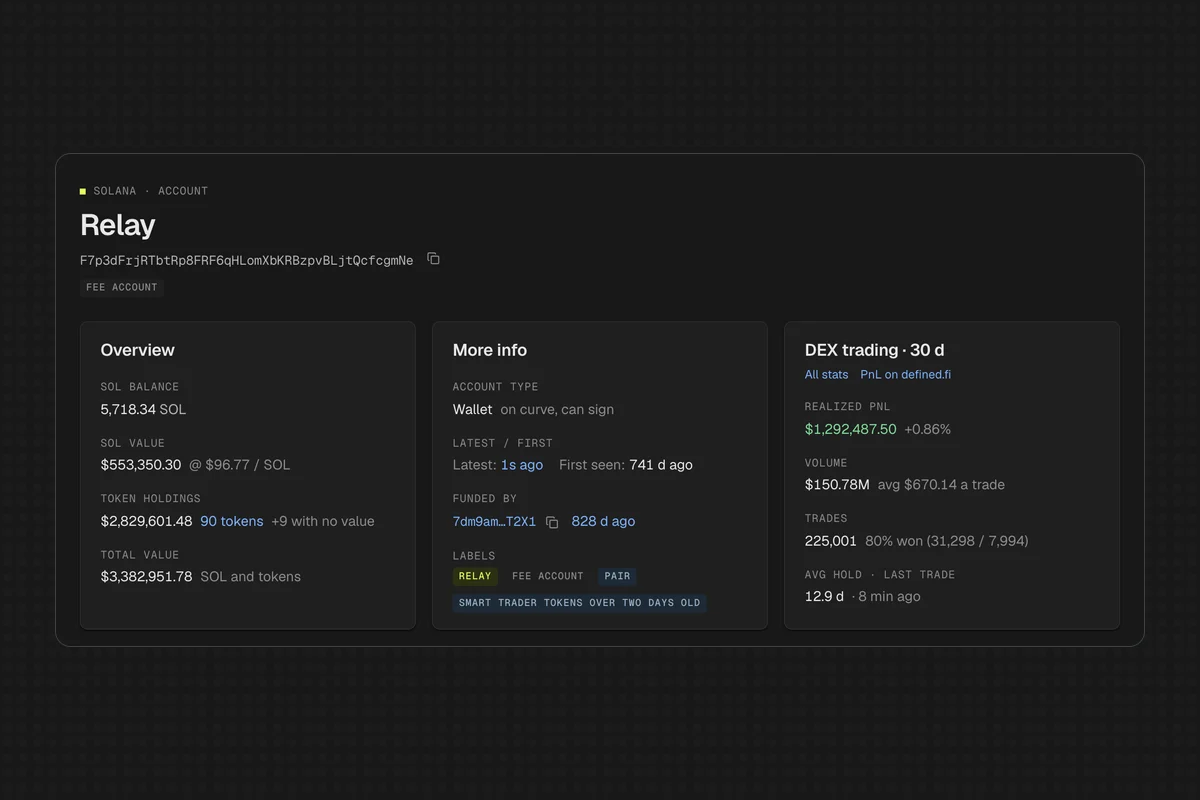
Open any address at scan.codex.io/sol/address/<address>, or paste it into the search box. Here's a high-volume Solana account labeled as Relay's fee account. The overview shows:
- Balances: SOL balance and value, token holdings value and count, and total value.
- Account type: whether it's a regular wallet that can sign.
- First and latest seen: how old the wallet is and when it last moved.
- Funded by: the address that sent the wallet its first SOL, with the amount and time.
- Labels: known entities and tags where Codex has them, like Relay or "smart trader".
- DEX trading, 30 days: realized PnL, volume, trades, win rate and average hold.
Five tabs go deeper:
| Tab | What it shows | Use it to |
|---|---|---|
| Transactions | Every transaction that touched the account, newest first. DEX trades show their action, tokens and USD value. | Read the wallet's full history |
| DEX activity | DEX trades and liquidity events, valued in USD at trade time | See exactly what it bought and sold |
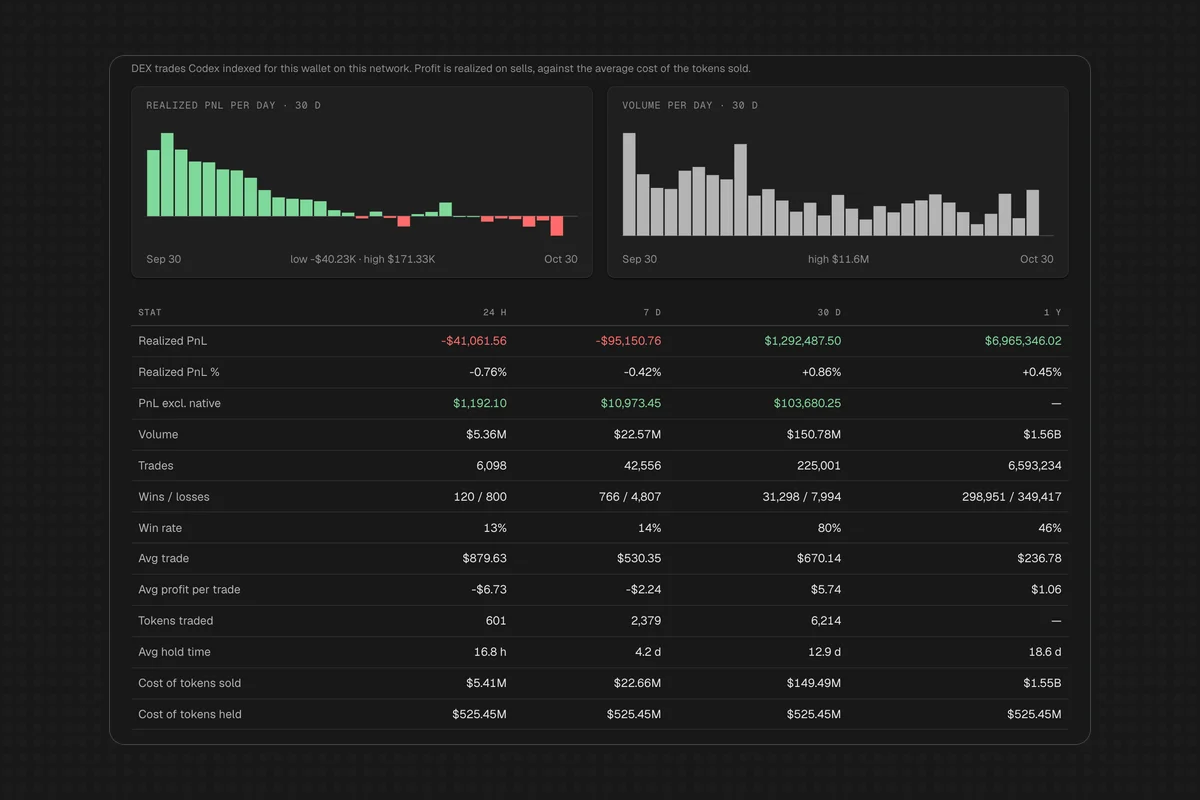
| Analytics | Realized PnL per day and volume per day (30 days); realized PnL, PnL %, wins and losses, win rate, average trade and tokens traded across 24h, 7d, 30d and 1y | Judge whether a trader is any good |
| Assets | Current token holdings | See what it holds right now |
| Logs | Program logs | Debug transactions |
How do I tell if a Solana wallet is a good trader?
Look at the Analytics tab, not just the PnL headline. A big 30-day PnL can come from one lucky trade. Check four numbers together:
- Win rate: what share of trades closed in profit.
- Trade count: a high win rate over 10 trades means less than one over 500.
- Average profit per trade: whether wins are big enough to cover losses.
- PnL excluding native: realized PnL with trades of SOL itself left out, so you see how the wallet did on the tokens it picked.
Then compare windows. A wallet that's profitable across 7d, 30d and 1y is more convincing than one with a single good week. In the example below, the 30-day win rate is 80%, but the 24-hour rate is 13% and the 1-year rate is 46%, so the headline number alone would mislead.
Finally, check Funded by. Wallets funded from the same source are often run by the same person, which matters if you're following a "smart money" wallet that might be one of several.
How do I look up what a Solana transaction did?
Click any transaction in the wallet's history, or paste a signature into search. Scan opens the transaction page directly. It starts with a plain summary, like "Swap 23.07 SOL for 2,226.91 USDC on Orca SOL/USDC", then:
- Instructions: the call tree with inner instructions, program names (for example, Orca Whirlpool swap_v2 and SPL Token transferChecked) and the compute each instruction used.
- Balances: SOL and token balance changes for every account, with USD values at the time.
- DeFi events: the buy or sell with its USD size and pool.
- Logs: raw program logs.
See this Orca swap for the layout.
How do I find wallets worth tracking?
Start from the tokens. Open a token on Solana's top, trending or new token lists, then its DEX activity tab. Every trade lists the wallet that made it. Click through to see that wallet's PnL and win rate.
Launchpads are another source. The pump.fun page shows new launches and tokens about to graduate. Early buyers of tokens that graduate are a common place to look. Other Solana launchpads like Bonk, LaunchLab and Moonshot are on /sol/launchpads. For more on launchpad data, see our pump.fun API guide.
Can I get alerts when a Solana wallet trades?
Not in Scan itself. Scan is an explorer: it shows a wallet when you look it up, but it doesn't send notifications or keep a watchlist. For live tracking, use the Codex API that Scan is built on:
- onEventsCreatedByMaker streams a wallet's trades over WebSocket as they happen.
- Webhooks can filter swap events by maker wallet and post them to your server.
- detailedWalletStats returns PnL, volume and win rate, the stats behind Scan's Analytics tab.
- getTokenEventsForMaker returns a wallet's trade history.
- balances returns current holdings.
That's enough to build a copy-trading feed, a Telegram alert bot or a smart-money dashboard. Our Solana API guide compares the options, and wallet-level onchain data covers the data model.
Does it work for wallets on other chains?
Yes. Scan has address pages on every network it lists, and one search shows every network an address exists on. EVM wallet pages show DEX activity, PnL analytics and holdings, like the Base explorer walkthrough covers. For tracing an address across chains, see what a multichain explorer does.